

virtualCMS Features
Here are some of the features you'll find in a virtualCMS website...
Email
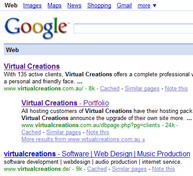 Search Engine Optimisation (SEO) - designing and implementing your site in such a way as to optimise your ranking with the various search engines (especially Google) - is very important for any website. Nobody wants their site to appear on page 71 of the Google search results. We know this, and so we design our sites with Search Engine Best Practises in mind at all times.
We won't say exactly what we do or how we do it (trade secrets, of course!), but there are a few features that you can expect to see on your site:
There are many other standard features for all virtualCMS websites...
Create and update items that are relevant to your business...
What sort of information do you store and show on your website? Lists of products, customers, events, retail outlets, members, courses, staff, etc are some of the common ones. virtualCMS can track these, of course. In fact, if you want to track it, it can be tracked in a virtualCMS website using our online database technology. See if you can find another CMS so flexible!
For example, say you're a real estate agent - you'll want to keep track of properties. If you try to do this in a regular CMS, one that doesn't have any pre-programmed notion of what a "property" is, then to create a new page for a property with the same layout as an existing property page, you'll be obliged to copy and paste the existing page, then change the words, price, photos, etc. That's quite a cumbersome way of doing things, not to mention error-prone.
With a virtualCMS website, we would create for you a special "Properties" database, customised to your business's exact needs, and then every time you wanted to create a listing for a new property, you'd fill in a simple form:
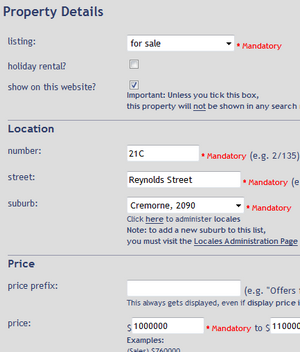
click for larger view
Once the property details have been entered, the property information can be reproduced as:
For example, say you're a real estate agent - you'll want to keep track of properties. If you try to do this in a regular CMS, one that doesn't have any pre-programmed notion of what a "property" is, then to create a new page for a property with the same layout as an existing property page, you'll be obliged to copy and paste the existing page, then change the words, price, photos, etc. That's quite a cumbersome way of doing things, not to mention error-prone.
With a virtualCMS website, we would create for you a special "Properties" database, customised to your business's exact needs, and then every time you wanted to create a listing for a new property, you'd fill in a simple form:

click for larger view
Once the property details have been entered, the property information can be reproduced as:
- Full-page property details (sample)
- Property search results (sample)
- Window-display sheet (for printing and putting in your shop-front window)
- "Available Properties" printout (for your reception counter)
- They can even be automatically uploaded to the various national real-estate sites (such as Domain and RealEstate.com.au)
Naturally, this flexibility is impossible in a regular Content-Management System.
And of course, you're probably not a real estate agent, so these features would be meaningless to you. But this same flexible approach can be taken to any data that you store on your site, whether you sell clothing or manage a football team.
For more information about this flexibility, please visit the virtualCMS page.
And of course, you're probably not a real estate agent, so these features would be meaningless to you. But this same flexible approach can be taken to any data that you store on your site, whether you sell clothing or manage a football team.
For more information about this flexibility, please visit the virtualCMS page.
Create and edit pages your own pages
Need another page in your website? Simply add it yourself. Every virtualCMS website comes with an integrated WYSIWYG (what you see is what you get) page editor. It's as easy as using Microsoft Word.
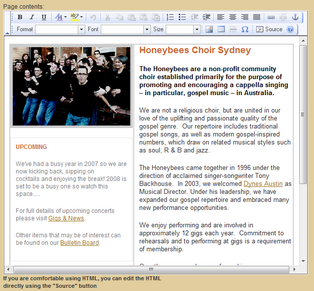
Here's a sample screenshot:
click for larger view
Here's a sample screenshot:
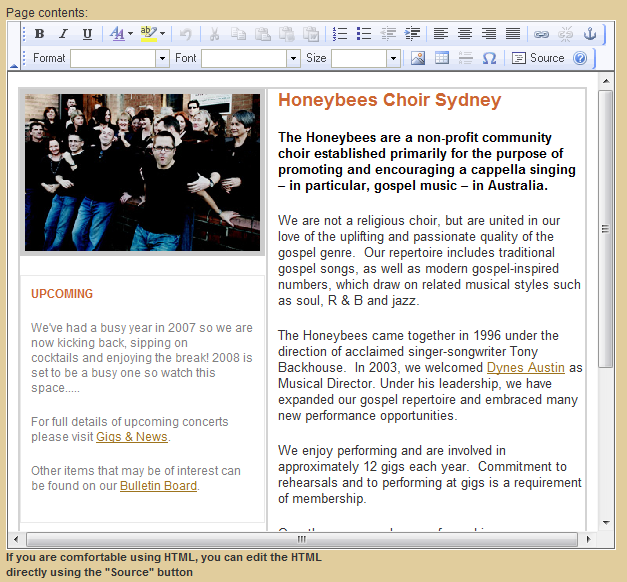
click for larger view
As you can see, all your favourite editing buttons are there: Bold, Italic, Cut, Paste, Bullets, Centering, Font, Colour, Insert image, Insert Hyperlink, etc, etc.
Once the page is saved, the exact updates you made are immediately visible on the page itself:
Once the page is saved, the exact updates you made are immediately visible on the page itself:
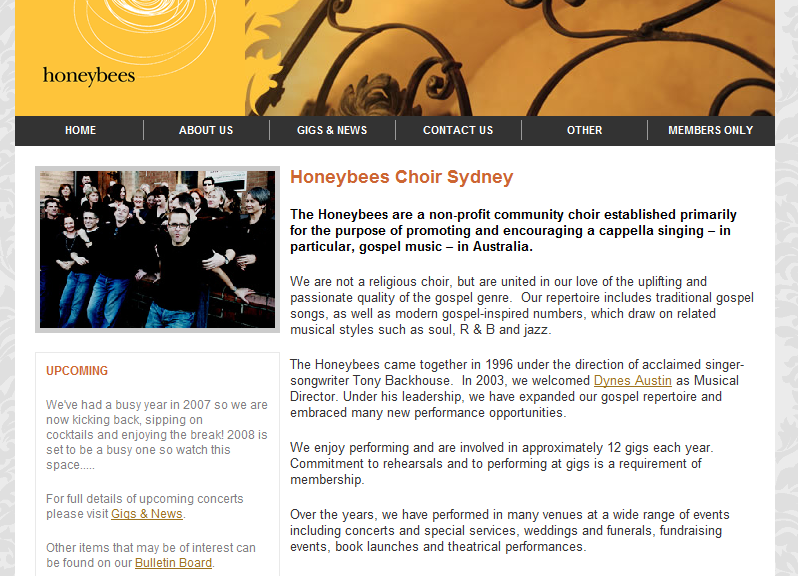
And if you happen to have HTML editing skills (or know someone who does), HTML can be entered directly into the page, via "Source" view.
The website's administration area is integrated into site itself
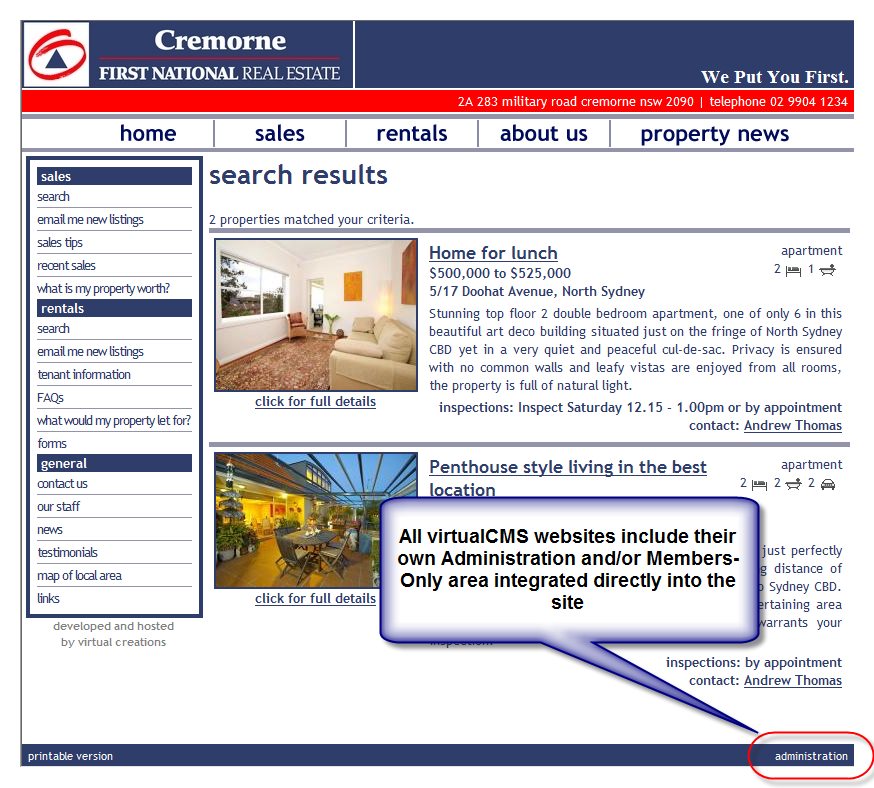
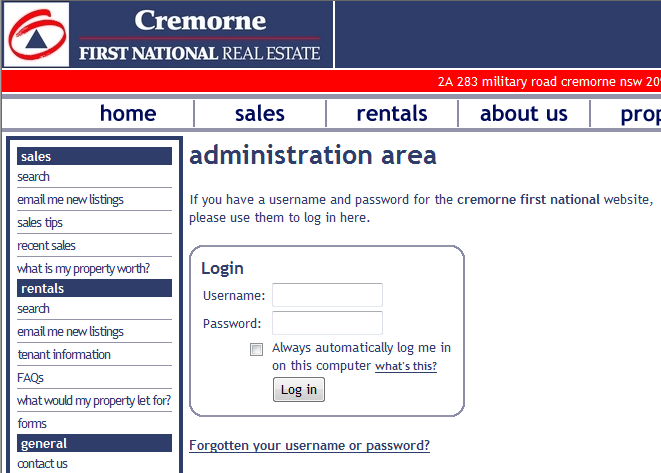
Unlike other content-management systems, there is no separate website where you administer your site - the administration of your site is part of the site itself.
This integration allows you to locate (for example) one of your products in your range and update it directly in your website. If you're logged in, all you need to do is look for the product's "Update" link/button (hidden from non-administrators).
On every page of your site, there will be an "Administration" link or menu item (often called the "Members Only" link, for sites that have members that can also log in). As an administrator, your unique username and password identifies you to the sytem as someone who can make changes to website content.
Persistent logins
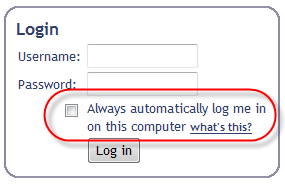
Sick of having to type in your username and password every time you revisit a site? With a virtualCMS website, you only ever have to log in once. Ever. If you tick a box during the login process (see image, right), the website remembers your login credentials for every subsequent visit. The next time you visit the site, you're automatically logged in, and you can begin making updates immediately.
If you ever want the website to stop remembering you, simply log out.
If you ever want the website to stop remembering you, simply log out.
Flexible Templates
All virtualCMS websites are template-based, meaning that every page on the site follows a standard look&feel, layout and colour scheme. This is especially useful when you come to create a new page: There's no need to create the top banner, the navigation menus, the footer at the bottom, etc - all this is already done. All you need to do is fill in the content.
Furthermore, emails sent out from a virtualCMS website are also template-based. Every email has the same graphical layout - usually similar to the site itself. There are also templates for printing, where the navigation menus and other unneccesary page items are not printed.
But wait, there's more. Every site can have multiple page templates - as many as you like - so that some pages can follow one layout, while other pages follow another. There can be special templates for special sets of pages.
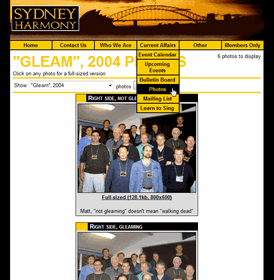
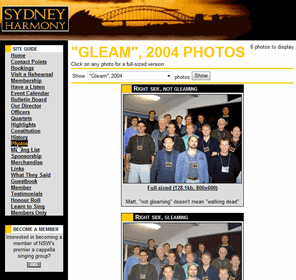
But there's still more: It's even possible to view any one of a site's pages in another template on the fly - while viewing the site! Check out these two versions of the same page:
Furthermore, emails sent out from a virtualCMS website are also template-based. Every email has the same graphical layout - usually similar to the site itself. There are also templates for printing, where the navigation menus and other unneccesary page items are not printed.
But wait, there's more. Every site can have multiple page templates - as many as you like - so that some pages can follow one layout, while other pages follow another. There can be special templates for special sets of pages.
But there's still more: It's even possible to view any one of a site's pages in another template on the fly - while viewing the site! Check out these two versions of the same page:
Click on either one to view the actual, live page on the Sydney Harmony website...
The version on the left sports pulldown menus, while the one on the right uses standard "list" menus. They're exactly the same page on the site, just viewed with different templates. The cool part is you can switch between them with one mouse click, and you don't even have to be logged in as an administrator! Try this out for yourself: Visit one of the pages above by clicking on one of the images, then scroll to the bottom of that page and look for a link called either Pull-down menus or Standard menus.
Rearrange and add to your site navigation menus
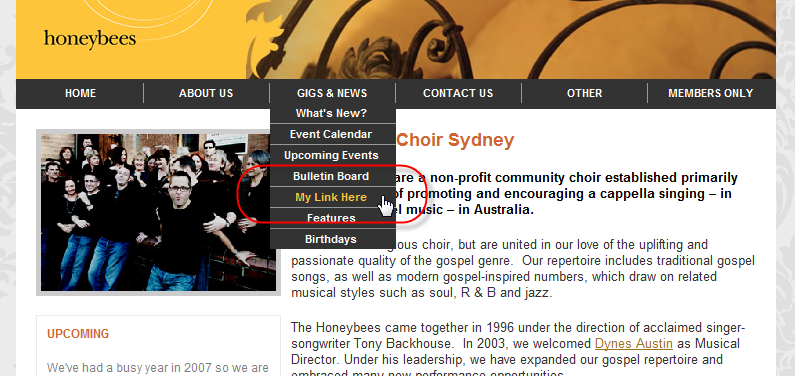
There's no point in being able to create new pages if you can't add them into the site's navigation system. virtualCMS websites allow you to add your own links to the site's menus. These links can point to a page you've just created, any other page in your site, or any other website.
virtualCMS supports many menu systems, including JavaScript-based systems, or the more modern, more search-engine-friendly CSS-based systems. The menus can appear as lists, pull-down menus, slide-out menus or virtually any other structure.
Adding a new menu item takes only a couple of seconds.
virtualCMS supports many menu systems, including JavaScript-based systems, or the more modern, more search-engine-friendly CSS-based systems. The menus can appear as lists, pull-down menus, slide-out menus or virtually any other structure.
Adding a new menu item takes only a couple of seconds.
Email is a fundamental part of any communications suite, and virtualCMS websites are fully email-ready.
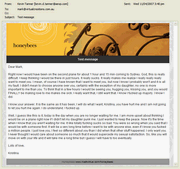
Sample "branded" email
Email notifications can be triggered by virtually any event (such as a new document being added to the site, or a new guestbook entry, or a member updating their email address, or a calendar event being updated, or a particular customer logging on - in fact, just about anything you can think of), and the system can be configured to send such emails to any interested party, such as the site owner, subscribers, members, your entire customer base or one individual customer.
It is possible to send "branded" emails on demand (emails that resemble your website itself, complete with logo and matching font and colour schemes). Simply log into your site, navigate to the "Send email" page, compose your email and send out a professional looking "branded" email with just a couple of clicks.
Such "branded" emails can also become your newsletters, being sent out to your customers, subscribers, suppliers or anyone else you nominate. Such newsletter emails are also stored on the website for archival purposes.
Your site visitors can even email themselves (or their friends) information they find useful on your site. For an example of this, visit this page (then click email this to me) or this page.
Finally, the site can even receive emails! The site can be programmed to check particular email mailboxes, looking for messages that have, for example, the word "unsubscribe" in the subject line (whereupon that person's email address would be removed from the subscriber database, etc).
Sample "branded" email
It is possible to send "branded" emails on demand (emails that resemble your website itself, complete with logo and matching font and colour schemes). Simply log into your site, navigate to the "Send email" page, compose your email and send out a professional looking "branded" email with just a couple of clicks.
Such "branded" emails can also become your newsletters, being sent out to your customers, subscribers, suppliers or anyone else you nominate. Such newsletter emails are also stored on the website for archival purposes.
Your site visitors can even email themselves (or their friends) information they find useful on your site. For an example of this, visit this page (then click email this to me) or this page.
Finally, the site can even receive emails! The site can be programmed to check particular email mailboxes, looking for messages that have, for example, the word "unsubscribe" in the subject line (whereupon that person's email address would be removed from the subscriber database, etc).
SMS
For those occasions when email is not immediate enough, our websites are also SMS-enabled. Just like with emails, your website can be configured to send text messages in response to certain events (sale of a particular product, request for information, usage quota being exceeded, etc).
It is also possible to log into your site and type in an SMS to be sent to any mobile phone you nominate. Such text messages can be archived on your website for future reference.
Note that enabling your website to send SMS text messages involves an extra A$150 setup fee, plus a charge of $0.20 per text message.
It is also possible to log into your site and type in an SMS to be sent to any mobile phone you nominate. Such text messages can be archived on your website for future reference.
Note that enabling your website to send SMS text messages involves an extra A$150 setup fee, plus a charge of $0.20 per text message.
Google-Friendly
Search Engine Optimisation (SEO) - designing and implementing your site in such a way as to optimise your ranking with the various search engines (especially Google) - is very important for any website. Nobody wants their site to appear on page 71 of the Google search results. We know this, and so we design our sites with Search Engine Best Practises in mind at all times.We won't say exactly what we do or how we do it (trade secrets, of course!), but there are a few features that you can expect to see on your site:
- A site map. Sites can often be designed with pull-down menus for navigation between pages. Some of these menu systems make it hard for Google to index your entire site - because they can't get to every page. A virtualCMS website cames with a dynamically generated site map - a page where all your other pages are listed. Google (and the other search engines) will be able to index every page of your site. Every time you make a change to your site's navigation menu (see above), your site map is automatically updated. Here's a sample - notice how it exactly mirrors the site's pull-down menus?
- Insert your own keywords. virtualCMS allows you to add search engine keywords to every page on your site - even different keywords on every page.
- Google site search. There are various ways that your visitors can search your site for information. One of them is by using an embedded Google search. This means that you can provide your visitors a way to initiate a Google search from within your site! They can choose to search either in your site or on the whole World Wide Web. Look on this page for an example (about halfway down the page).
Other Features
There are many other standard features for all virtualCMS websites...
- Multiple Security Levels. Every site offers 5 levels of access privileges: Public access, 2 levels of member/customer/supplier access, administrator access, and webmaster access. The site's webmaster (typically the owner of the site) decides which person is assigned which access level, and also decides which pages are visibe to which access level.
- Rotating banner ads. You can make money on your own website by offering to host banner ads from other organisations. Once each organisation sends you their ad, it is a simple matter to upload it to your site with a couple of mouse clicks. It is then displayed on your site - either on specific pages, or all ads randomly show on all pages.
- Audit trail. Do you run a large organisation, with many people maintaining website content? Need to know who made changes to what on your site? With a couple of mouse clicks you can enable the site's "audit trail" facility, which keeps a log of what changes were made, and who made them.
- Page Hit log. The site can automatically keep track of each hit on each page, as well as who viewed the page (if it was someone logged in). This log can then be exported to Excel for easy analysis.
- Printable version of every page. On every page you can find a link/icon to show a "printable version" of that page - the exact content of the page shown in such a way that it is optimised for printing (without navigation menus, etc).
- RSS feeds. RSS is a method of syndicating the content of your site that frequently changes (news, headlines, events, newsletters, etc) and making the content updates available to interested parties (see this page for more information). virtualCMS supports RSS, which can be enabled for any type of content on your site.
- Auto-thumbnail uploaded images. Various types of content on your website will require accompanying photographs or images. When these photos are displayed (such as in your product catalog), it is preferable that they all have a consistent size - preferably a small size, but when you click on the small-sized version (the "thumbnail"), the full-sized version of the photo is displayed. virtualCMS will take care of this task for you, creating a thumbnail version of every uploaded image with a consistent size (sample is on the right).
 Anti-spam images. If you offer forms on your website that the general public can fill in (such as a feedback form, a "Contact Us" form or a guestbook), you will inevitably be discovered by the "spam-bots" - automated programs that enter rubbish information into your forms that flood you with junk email (advertising Viagra, mobile ringtones, etc). A sure-fire way of stopping such spam is to add a verification image (such as the one on the right) to the form. virtualCMS can insert one of these automatically onto any form you specify.
- Referrer-tracking. A built-in database keeps track of how people found their way to your site. If you have marketing partners that send traffic to your site, give each one a unique address to use to get to your site. They will pass that address on to their subscribers, and virtualCMS will keep track of all visits to your site which used that address.
- Database export and import. All content in a virtualCMS website is stored in an online database, including the page contents, events, members, products, customers, orders, etc. This information can be easily exported to CSV files, which can be then opened in Microsoft Excel or any other database analysis program. Such CSV files can also serve as a backup of the website database. And of course if you quickly need to insert lots of database content in one go, you can use CSV files to import information quickly into your site.
Need more information?
- Read the overview of virtualCMS
- Did you know we have ready-to-use turnkey solutions for online stores (eCommerce), Real Estate Agents, and Singing Groups, all built using virtualCMS?
- If your needs are more particular, you may be interested in the many virtualCMS Modules that are available immediately to plug into your new website
- Have a look at some of the many virtualCMS websites that are out there on the Net